Local Model Provider
The Local model provider in Casibase enables you to connect to self-hosted/local models or any custom model provider that implements an OpenAI Chat Completion-style interface. This gives you maximum flexibility to use models not directly supported by Casibase while maintaining full control over your infrastructure and data.
When to Use Local Provider
The Local provider is recommended in the following scenarios:
Custom Provider Integration:
Use the Local provider when you need to connect to a model provider that is not listed in the Casibase provider dropdown, but exposes an OpenAI-compatible Chat Completion API.
Many modern LLM services implement this standard interface for compatibility, making them easy to integrate via the Local provider.
Self-hosted or Local Models:
The Local provider is also suitable when running your own models in local or private environments. This includes popular frameworks such as vLLM, LocalAI, LM Studio, llama.cpp, or any custom deployment that supports the OpenAI Chat Completion format.
By using the Local provider, all data remains within your own infrastructure, making it ideal for sensitive workloads, regulatory compliance, and development or testing environments.
Configuration
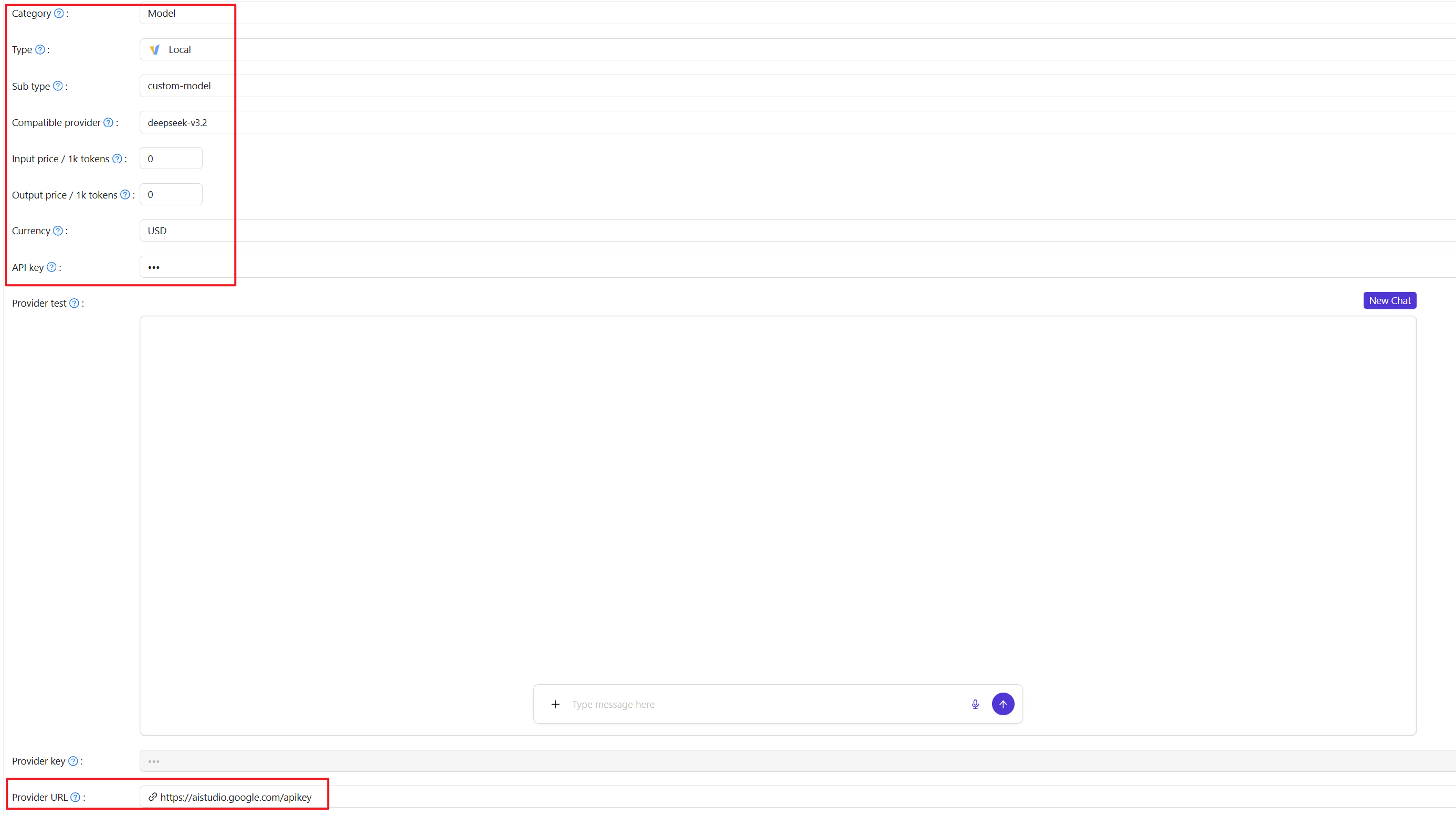
The following image shows the provider edit page when configured as a local type:
Required Fields
When adding a Local model provider, configure these essential fields:
Category: Set to Model to indicate this is a model provider rather than embedding or other service types.
Type: Select Local from the dropdown.
Subtype: This field is automatically set to custom-model and cannot be changed. It identifies the provider as a custom implementation.
Compatible provider: Enter the model name you want to use. You can either select from the dropdown suggestions or type any model name directly.
Provider URL: The HTTP(S) endpoint where your model service is running. This is the base URL that Casibase will use to make requests. For example:
http://localhost:8000/v1for a local OpenAI-compatible serverhttp://192.168.1.100:8000/v1for vLLMhttps://my-model-service.company.com/api/v1for a custom deploymenthttps://cloud.infini-ai.com/maas/v1
The endpoint should implement the /chat/completions path that accepts OpenAI format requests.
API key: If your model service requires authentication, provide the API key or token here. Leave empty if your service doesn't require authentication (common for local deployments). The key is sent in the Authorization header as Bearer <key>.
Pricing Configuration
These fields help track usage costs when using paid services or for internal billing:
Input price / 1k tokens: Cost per 1,000 input tokens. Enter the numeric value (e.g., 0.001 for $0.001 per 1k tokens). Set to 0 for free models.
Output price / 1k tokens: Cost per 1,000 output tokens.
Currency: The currency for pricing. This is used for cost tracking and reporting.
Configuration Example
OpenAI-compatible service:
- Compatible provider: Any model you prefer
- Provider URL: Service endpoint URL
- API key: Your service API key
- Input/Output price: According to the service pricing
Using the Provider
After saving your Local model provider, you can use it just like any other provider in Casibase. Select it when creating chats, configuring stores for RAG, or any other feature that requires a model provider.
When the provider is in use, Casibase sends requests to your configured Provider URL using the OpenAI Chat Completion format. Your service should respond with compatible JSON responses.
Troubleshooting
Connection refused: Verify the Provider URL is correct and the service is running. Check firewalls and network connectivity.
Authentication errors: Ensure the API key is correct if your service requires authentication. Some services use different authentication methods - verify your service supports Bearer token authentication.
Unexpected responses: Confirm your service implements the OpenAI Chat Completion API format correctly. Check the service logs for details about request/response formats.
Model Not Found: If the service returns a “Model Not Found” error, verify that the Compatible provider field in Casibase is configured correctly and that the model has been loaded and is available in the deployment environment.